
Disclosure: Hypertrophy Protocol may earn a commission if you buy through some links on this page, at no extra cost to you.
Your VOLTRA I can’t pull a single rep until it’s locked to something. For most power rack owners, the right VOLTRA rack mount is the Sliding Rack Mount in your upright size if you change cable height between exercises, or the bolted Fixed Rack Mount if you train at one height. Without a rack, you choose between the bar mounts, the Strap Mount and the DIY Dock, depending on the anchor you have.
Every Beyond Power VOLTRA mount spec below was checked on September 28, 2026, on Beyond Power’s product pages and help center. For the unit itself, start with the VOLTRA I guide.
At a glance
| Your setup | Mount | Fit requirement | Main catch |
|---|---|---|---|
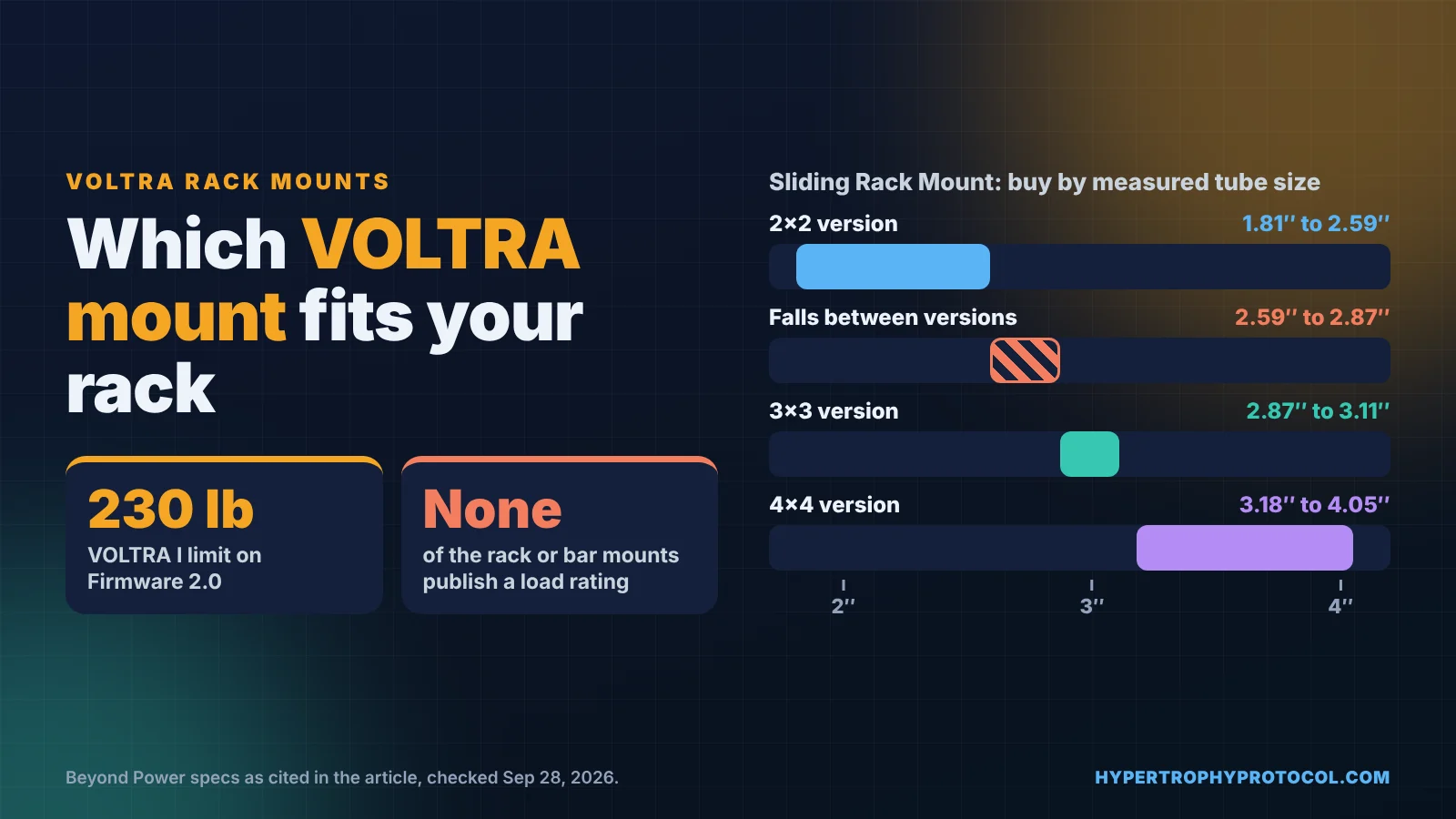
| Rack with side holes, height changes every exercise | Sliding Rack Mount | Buy by measured tube size; 5/8″ to 1″ holes | Needs side holes; tubes of 2.59″ to 2.87″ fall between versions |
| Rack, one training height | Fixed Rack Mount (pair) | 5/8″ or 1″ hole version | Moving it means unbolting |
| Front holes only, or several racks | Adaptive Rack Mount | Uprights up to 4″; 5/8″ to 1″ holes | Height changes are slower than sliding |
| Small space or travel | Fixed Rack Mount Mini | Holes 15 mm and up; 2″, 3″ or 4″ spacing | Showed Sold Out on September 28 |
| Solid pull-up bar, no rack | Fixed Bar Mount (1″ to 2″) or Adaptive Bar Mount (0.6″ to 2″) | Anchor must support at least 200 lb (Adaptive Bar Mount page) | Bar must not rotate, flex or shift |
| Column, steel frame or tree | Strap Mount | Round 80 mm or square 70 mm minimum | A 2×2 upright needs the optional shim |
| Wall or box station | DIY Dock or DIY Dock with Base Plate | Metal plate; or plywood 40 mm+, solid concrete 100 mm+ | No wood plate, drywall or hollow walls |
None of the rack or bar mounts publish a load rating; treat your highest setting, up to 250 lb, as the load your anchor must hold. Specs from Beyond Power’s pages, checked September 28, 2026. Confirm before ordering.
Which measurements decide whether a VOLTRA rack mount fits your rack?
Choosing starts with a tape measure. From your rack you need the outside size of the upright, the hole diameter, whether holes run through the side faces as well as the front, and the hole spacing. The power rack upright sizes guide shows how to measure 2×2, 2×3 and 3×3 tubing.
Without a rack, the numbers change. Bar mounts care about bar diameter, the Strap Mount about the size of the post it wraps, and the DIY Dock about the plate or wall behind it.
| Mount | Attaches to | Fit range | Adjustability | Stated rating | Notes | Source |
|---|---|---|---|---|---|---|
| Fixed Rack Mount (pair) | Rack upright holes, bolted | 5/8″ or 1″ hole version; maximum upright size not published | Moderate: unbolt and rebolt | None published | Two per box; permanent single-height station | Product page |
| Fixed Rack Mount Mini | Power rack or squat stand holes | Holes 15 mm (0.59″) and up; 2″, 3″ or 4″ hole spacing | Moderate: unbolt and rebolt | None published | Stainless; folds flat for carrying | Product page |
| Adaptive Rack Mount | Rack upright holes, pin and threaded rod | Uprights up to 4″ (102 mm); 5/8″ to 1″ holes via reversible pin | Easy: remove and reinstall, no tools | None published | No side holes needed | Help center |
| Sliding Rack Mount | Clamps around the upright; pin locks height | 2×2 (1.81″ to 2.59″), 3×3 (2.87″ to 3.11″), 4×4 (3.18″ to 4.05″), 2×3, 2×4, 3×4; 5/8″ to 1″ holes | Very easy: slide and pin | None published | Side holes required; spacers included except on the 3×3 version | Product page |
| Fixed Bar Mount | Round bar, crossmember or pull-up bar | 1″ to 2″ bar (two spacer sets: 1″ to 1.5″, 1.5″ to 2″) | Loosen screws and re-clamp | None published | Permanent overhead anchor; indoor use | Help center |
| Adaptive Bar Mount | Round bars, plate pegs, pull-up bars, posts | 0.6″ to 2″ (16 to 51 mm) bar | Tool-free quick release | Anchor must support at least 200 lb | Bar must not rotate, flex or shift | Product page |
| Strap Mount | Columns, steel frames, tree trunks | Round 80 mm (3.15″) or square 70 x 70 mm (2.76″) minimum; 0.5 m and 1 m straps | Unstrap and rewrap | None published | Optional shim for smaller anchors | Help center |
| DIY Dock | Your own plate or box build | 370 mm open space; SUS304 plate 6 mm+ (help center: steel 5 mm+, aluminum 10 mm+, no wood) | Fixed where installed | None published | Packs of 2, 6, 24 or 48 | Product page, help |
| DIY Dock with Base Plate | Plywood or concrete wall | Plywood 40 mm (1-5/8″) or thicker; solid concrete 100 mm (4″) or thicker | Fixed where installed | None published | No drywall, hollow walls or brick veneer | Product page |
| Mini Rack | Concrete floor (bolted) | 3×3, 11-gauge upright; 1″ holes at 2″ spacing; 80″ or 90″ tall | Fixed upright | 1,000 lb rackable capacity when bolted to concrete | 80″ versions sold out, 90″ in stock (Oct 19) | Product page |
| Rotator Add-on | On top of any AnyMount | Any AnyMount; built for VOLTRA I | Rotates up to 120 degrees when you pull | None published | Not a standalone mount; tested through 20,000 rotations | Product page |
Look down the rating column and the pattern is plain. Only two pages carry a load figure, and neither rates the mount holding the VOLTRA: the Adaptive Bar Mount sets a floor for the anchor, and the Mini Rack’s figure is for the rack. Everything else gives fit, not force, so the unit’s own ceiling (230 lb on Firmware 2.0, or up to 250 lb in Beyond Power’s separate Project Overdrive Beta) and your anchor’s strength set the real limits.
Is the Sliding Rack Mount worth it if you change cable height every exercise?
If you move the cable between most exercises, the Sliding Rack Mount is built for you. You pull the Adjustable Pin, slide the mount and push the pin back in (help center). Every other rack mount has to come off and go back on, or be unbolted, to change height.
Fit is strict, because it clamps around the upright and you buy it by tube size. The ranges leave gaps, so a tube measuring between 2.59 and 2.87 inches falls between the 2×2 and 3×3 versions. Measure the actual outside dimension, not the size the rack is sold as.
It is also the only rack mount in Beyond Power’s comparison chart that needs side holes, so a rack drilled on the front only rules it out. If it won’t sit flush or clamps at an angle, the likely cause is the wrong spacer. Check the versions on the Sliding Rack Mount page before you pick one.
When is a fixed or adaptive VOLTRA mount the better buy?
If you train at one height, the sliding hardware buys you little. The Fixed Rack Mount comes as a pair and fastens to your rack with two screws, in a 5/8 inch or 1 inch hole version. Moving it means unbolting, so it suits a station that stays put.
The Adaptive Rack Mount sits between the two. A reversible pin drops into one hole, a threaded rod passes through the hole above, and a trigger locknut clamps it, all without tools. Changing height is slower than sliding, but it needs no side holes and moves easily between racks (see the Adaptive Rack Mount page).
The Fixed Rack Mount Mini is the compact bolted choice for small spaces and travel. It matches 2, 3 or 4 inch hole spacing and folds flat. Its product page showed Sold Out on September 28, so confirm stock before you plan around it.
Take a common 3×3 rack with 1 inch holes on the front and sides. Every rack mount fits it, so the choice comes down to how often you move the cable. Change height every exercise and the Sliding version earns its place; train at two fixed heights and a Fixed pair loses you nothing.
What are your options with no power rack?
Without a rack, the next best anchor is a solid round bar. The Fixed Bar Mount clamps a pull-up bar or crossmember with screws tightened in two rounds, making a permanent overhead anchor. The Adaptive Bar Mount clamps by hand, fits thinner bars, and repositions with a quick-release handle.
The Adaptive Bar Mount page is the only one that sets a strength floor: the mounting point must support at least 200 lb (a figure written before the 230 lb update), and checking that before each use is on you. That floor was written before the 230 lb update, so it is not proof that an anchor is enough now: the VOLTRA pulls up to 230 lb on Firmware 2.0 (250 lb on the Overdrive beta), so before heavier use check the current instructions for your exact Beyond Power mount, rack, hardware and direction of pull. If the bar can rotate, flex or shift, don’t mount to it.
The Strap Mount wraps a column, steel frame or tree trunk. Its 70 mm square minimum rules out a 2×2 upright at 50.8 mm across unless you add the optional shim, while a 3×3 at 76.2 mm clears it. Thin posts, wobbly rails and towel bars are on Beyond Power’s not-suitable list.
The DIY Dock is a stainless ring and backplate you screw to your own plate, sold in packs up to 48 for multi-station builds. The product page asks for SUS304 at least 6 mm thick, while the help center allows 5 mm steel and rules out wood, so build to the thicker figure. The DIY Dock with Base Plate is the wall version, for thick plywood or solid concrete and never drywall or hollow walls.
The Mini Rack is a single 3×3 upright that bolts to a concrete floor. Its bundled hardware covers bolts and concrete anchors, not a VOLTRA mount, so plan for a rack mount on top. On October 19 the 90″ versions were in stock and the 80″ versions sold out, and some mounts showed different stock labels on different Beyond Power pages that day, so check before ordering.
What does the Rotator Add-on add to your VOLTRA AnyMount?
Whichever mount you choose, the Rotator Add-on can go on top of it. I run the Rotator Add-on on top of an existing AnyMount. It is not a standalone mount; it slides onto any AnyMount and locks (installation reminder).
It turns up to 120 degrees, moving only when you apply force through the VOLTRA, and keeps the screen in view as it turns. The design reduces cable friction, and it was tested through 20,000 rotations with minimal wear, per the Rotator Add-on page.
Because the unit turns toward your line of pull, angled and rotational work is where it pays off. If you mostly pull straight down or straight back, a fixed mount already points the right way. The VOLTRA I training modes guide covers which settings to use once you’re mounted.
How do you keep any VOLTRA mount safe at full load?
Rotation only helps if the mount under it holds. The VOLTRA I’s specifications page now lists 230 lb, the limit on every unit since Firmware 2.0 (up to 250 lb in the separate Project Overdrive Beta), and none of the rack or bar mounts publish a load rating. Follow Beyond Power’s instructions for your mount exactly, and treat the highest setting you use, up to 250 lb, as the load your anchor has to hold.
Each help article repeats one routine: unload the cable before adjusting, confirm the lock, and make a light test pull before going heavy. The Fixed Rack Mount guide also asks for at least 83 inches clear on both sides and a 20 inch buffer in front beyond the cable and your movement.
If your rack isn’t bolted down, Beyond Power recommends adding weight plates to it for heavy work. The fixed mounts are for indoor use only, away from rain and high humidity.
Which AnyMount should you buy for your setup?
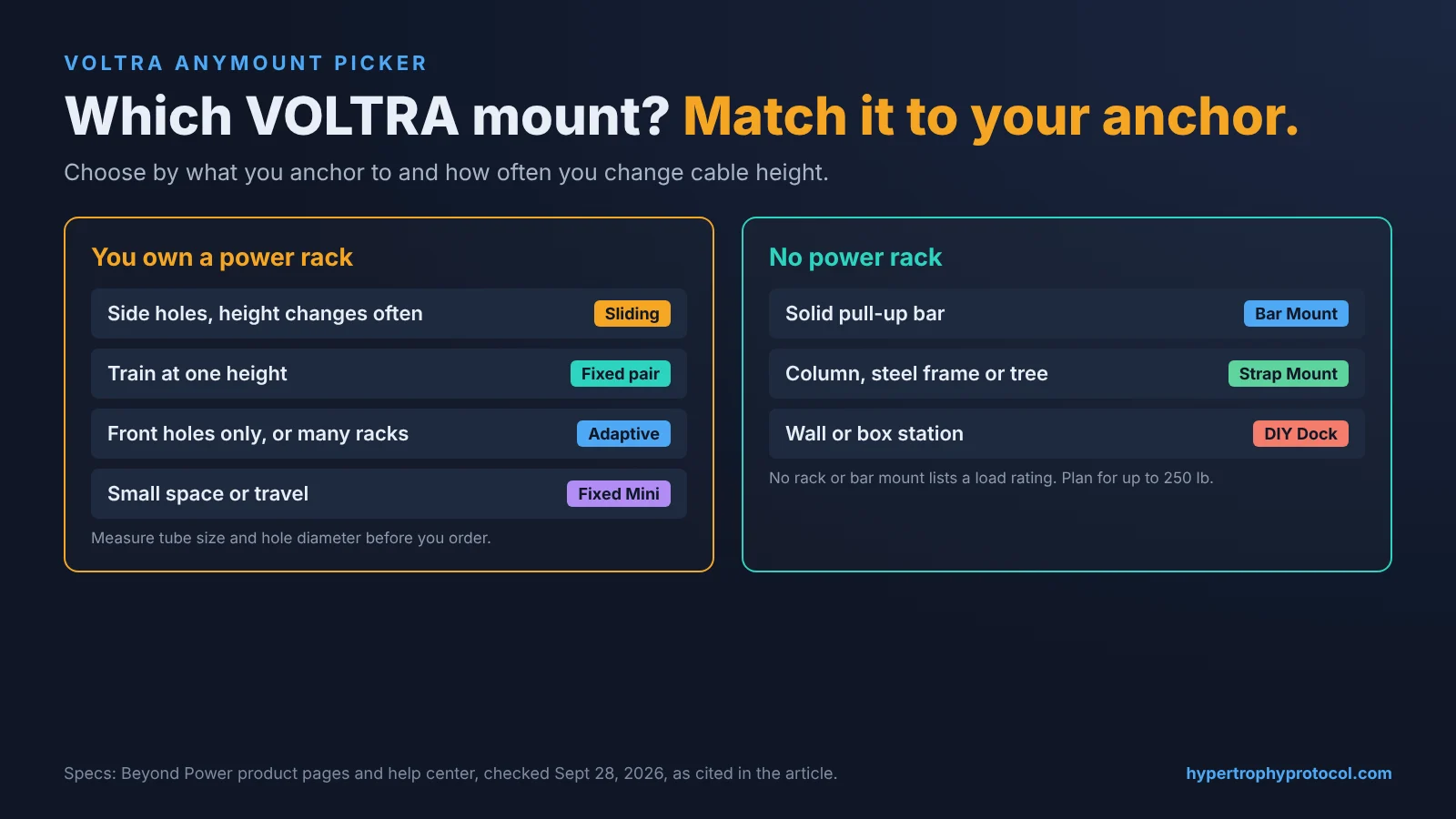
If your rack has side holes and you change height between exercises, buy the Sliding Rack Mount in the version that matches your measured upright. If you train at one height, the Fixed Rack Mount pair is the simplest bolt-on, and the Mini suits you if you also want to carry it.
If your rack has front holes only, or you move between racks, the Adaptive Rack Mount goes on without tools. With no rack but a solid pull-up bar, take the Fixed Bar Mount for a permanent anchor or the Adaptive Bar Mount if the bar is under an inch or you’ll move it.
If you train in different places, the Strap Mount works on a round anchor at least 80 mm across or a square one at least 70 mm. For a wall or box station, use the DIY Dock on metal plate or the Base Plate version on plywood or concrete.
Before you order a rack mount, run your uprights through the Rack Attachment Fit Checker to confirm tube size and hole diameter. Those two numbers pick the version for you.
Sources checked September 28, 2026. Manufacturers change specs; confirm on the product page before ordering.